Introduction
When a ransomware group posts a "leak" on its dark web site, the resulting media coverage typically focuses on the victim's name or the sheer volume of data exfiltrated. This framing significantly understates what ransomware leak data actually represents from a defensive and analytical perspective. For analysts, the raw data itself is far from a clean, searchable database.
From an analytical perspective, leak data can be viewed as a partial snapshot of an organization's internal information ecosystem at the time of compromise. This snapshot often includes deeply nested directory structures, temporary system artifacts, and a wide range of file formats ranging from .sql database backups and .pst mail archives to .git repositories and common document types such as .docx and .pdf. Importantly, a substantial portion of most leak datasets consists of pure "noise" including operating system binaries and application cache files that provide little to no intelligence value while contributing significant data volume.
The challenge for a security researcher or incident responder is that raw leak data is functionally unusable without a structured analytical approach. In its native state, the dataset is typically too large, too heterogeneous, and too disorganized for meaningful manual review.
Historically, analyzing more than a 1TB leak required days of manual/semi-automated effort grepping through files, cleaning, indexing, and performing selective sampling for surfacing relevant artifacts. As ransomware groups increasingly publish multi-terabyte datasets, the cognitive and operational burden on analysts scales faster than the data itself.
This is where the intersection of ransomware leak collection and LLM-assisted reasoning becomes transformative. By combining leak data acquisition with terminal-based LLM tools capable of reasoning across entire datasets, analysts can move beyond ad-hoc sampling toward systematic, repeatable intelligence extraction.
This blog approaches ransomware leak data collection and LLM-enhanced analysis as a structured intelligence workflow that prioritizes proper handling, scalable analysis, and actionable defensive outcomes.
Legal, Ethical, and Operational Guardrails
Analyzing ransomware leak data sits at the intersection of legal authority, ethical responsibility, and operational necessity. Ransomware leak sites are often intentionally made public by threat actors and typically lack access controls. When data is openly accessible on the public web without authentication or circumvention, it is generally treated as public-facing content rather than restricted material from a legal standpoint. Laws in several jurisdictions support the legality of downloading such leaked data for limited, internal analysis.
The primary legal risk stems not from accessing or analyzing publicly leaked data, but from how that data is used afterward. Reposting, redistributing, or repackaging leaked data for general consumption creates legal exposure related to privacy, data protection, or secondary harm. Ethical considerations remain relevant, particularly when handling sensitive personal or proprietary information.
Responsible ransomware leak analysis should prioritize purpose limitation, data minimization, and controlled handling. Throughout this blog, we assume leaked datasets are accessed without bypassing controls, analyzed for legitimate defensive or research purposes, and not redistributed beyond what is necessary for internal analysis, victim notification, or lawful reporting.
Analysts must recognize that ransomware leaks often contain highly sensitive information unrelated to immediate incident response objectives, such as personal data, employee communications, medical records, and third-party information. Responsible analysis requires intentional data minimization: focus only on intelligence necessary to understand impact and enable defense. Curiosity-driven exploration of sensitive material, even when technically possible, undermines trust and exposes analysts and organizations to unnecessary risk.
Operational guardrails are equally important. Ransomware leak datasets are massive, disorganized, and constantly changing. Clear internal policies governing access control, audit logging, and analyst exposure ensure that analysis remains consistent, repeatable, and defensible. These controls also provide accountability when findings are shared with victims, partners, or stakeholders. We created a secure operational system for downloading and analyzing ransomware leak data. This includes using isolated systems (cloud or local) for data downloading and dockerized containers for data analysis. Figure 1 shows a step-by-step operational system for collecting & analyzing ransomware leak dataset.
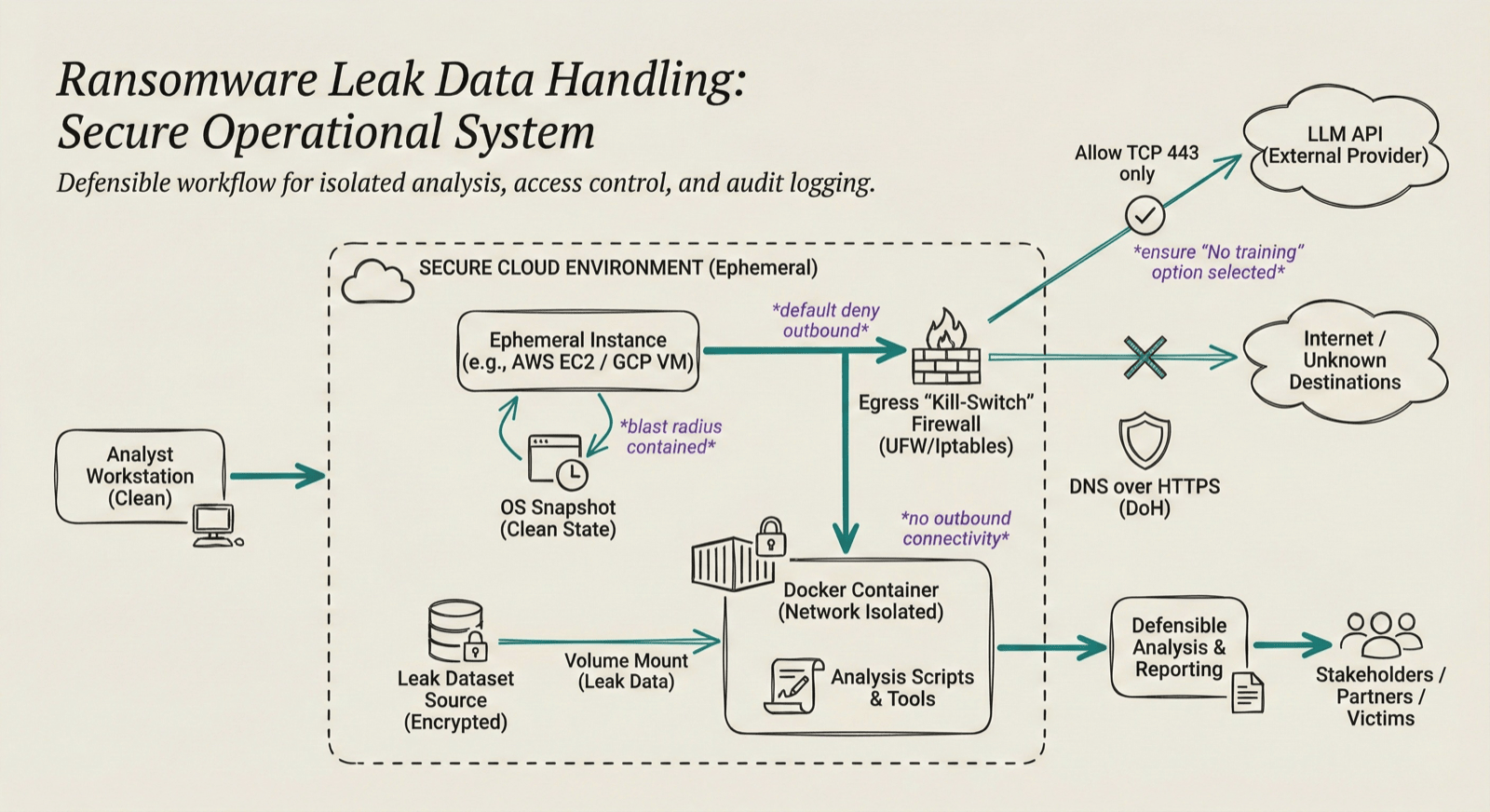
Figure 1: Step-by-step operational system for ransomware leak data handling (Generated with Nano Banana, updated by the author)
It's also important to acknowledge uncertainty. Leak data is almost always incomplete. Just because a specific file isn't in the leak doesn't mean it wasn't stolen. Conclusions drawn from leak analysis should be framed with appropriate confidence qualifiers and supported by observable indicators.
By establishing legal, ethical, and operational guardrails upfront, analysts can reframe ransomware leak data collection & analysis. Rather than viewing it as illicit material to be avoided or sensationalized, it can be treated, under the right conditions, as a constrained intelligence source that supports informed decision-making, victim support, and improved defensive posture.
The Golden Rule of Intelligence: If you found your company's internal data in a third-party breach, you would want to be notified. Acting as a responsible steward of this information strengthens the collective defense of the entire ecosystem. This blog does not constitute legal advice. Laws regarding data breach notification vary significantly by jurisdiction. Always consult with legal counsel before initiating third-party notifications.
End-to-End Workflow Overview: From Ransomware Leak Collection to Intelligence
To move beyond manual, ad-hoc analysis, we need a workflow that scales. This process is designed to minimize the time between "Data Discovered" and "Produced Intelligence," while ensuring that the analyst remains focused on high-signal intelligence rather than spending too much time with raw data formats.
Figure 2 shows the end-to-end workflow overview. It is divided into four distinct phases, each serving as a filter to refine raw data into actionable intelligence.
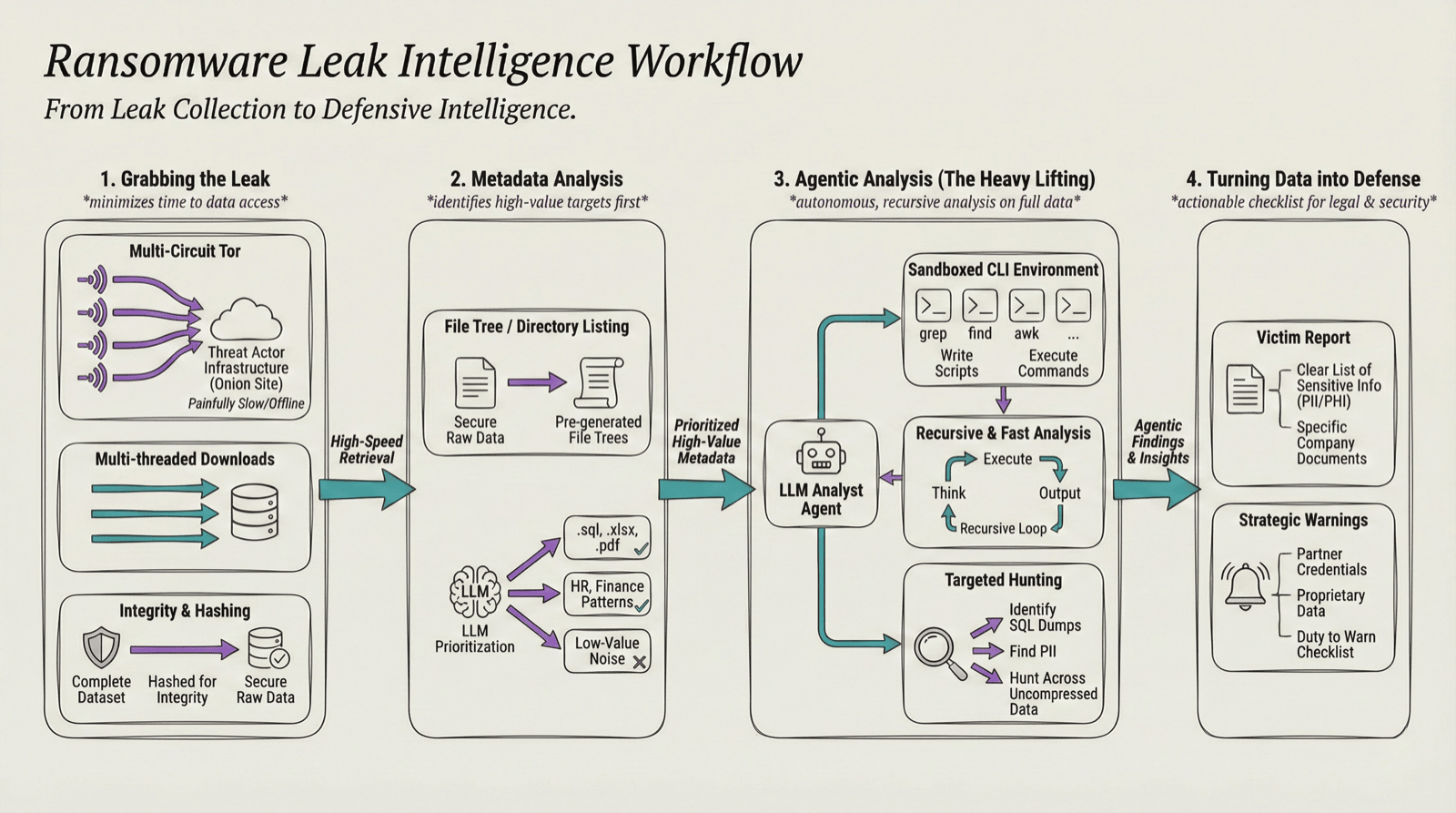
Figure 2: End-to-End Ransomware Leak Collection & Analysis Workflow (Generated with Nano Banana, updated by the author)
1. Grabbing the leak
Onion sites are painfully slow and go offline constantly. If you try to pull a massive dataset through a single Tor connection, it'll take weeks. We speed this up by running multiple Tor circuits at once and using multi-threaded downloads to grab chunks of data simultaneously. Multiple circuits enable parallel data fetching, aggregating bandwidth across different Tor relays. Once the dataset is downloaded, it is hashed to ensure integrity.
2. Metadata Analysis
Most ransomware groups dump a file tree or a directory listing. We feed this metadata into the LLM first to identify the high-value targets. We are looking for specific extensions like .sql, .xlsx, .pdf or directory patterns that suggest sensitive data (e.g., HR or Finance) This helps us prioritize what to analyze first. Figure 3 below shows a sample of file tree shared by a ransomware leak site.
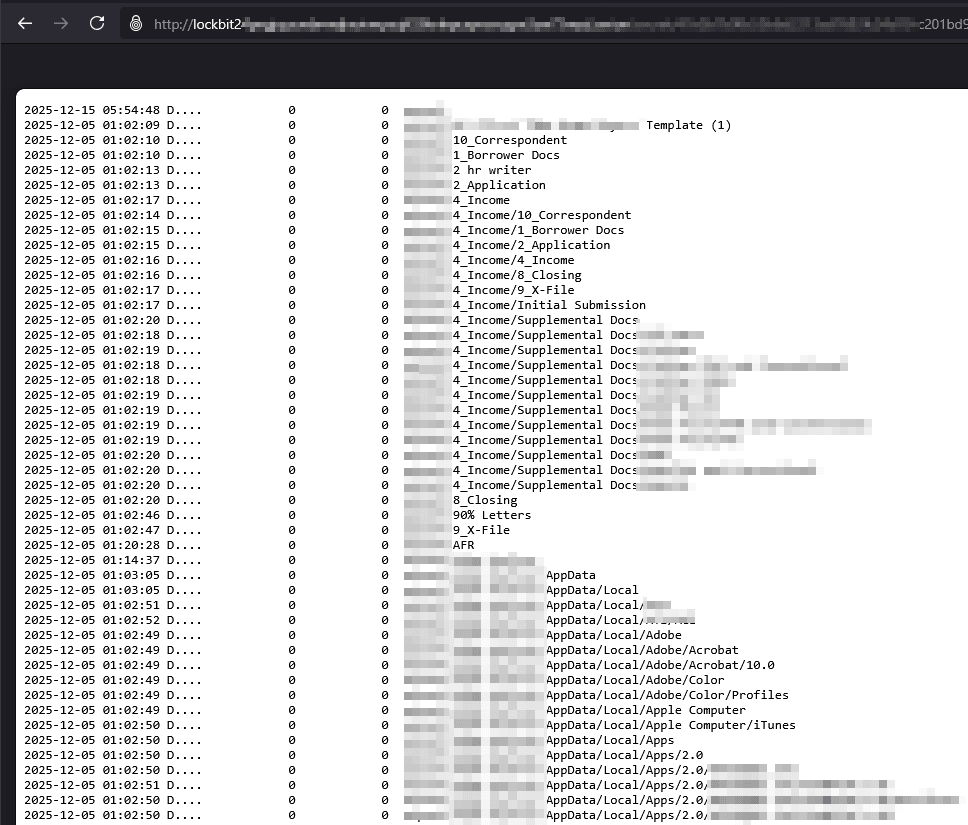
Figure 3: Sample of File Tree of a victim shared by ransomware leak site
3. Agentic analysis
Once we have the complete data and the metadata analysis, we give the LLM access to the sandboxed CLI environment along with the data access. This is where the LLM actually acts like an analyst. Based on the questions regarding the dataset, the LLM thinks, executes CLI utility commands like grep, find, write scripts, and provides output. It's recursive and much faster than an analyst manually clicking through folders or thinking about commands to execute manually. We can also ask it specific questions, like "Identify SQL dumps containing PII," and let it hunt across the entire uncompressed set.
4. Turning data into defense
The goal isn't just to see what was stolen, but to do something about it. We use the findings to build two things:
- A victim report: A clear list of exactly what sensitive info (like PII, PHI, or other sensitive company document) is out there.
- Strategic warnings: If we find credentials or proprietary data belonging to the victim's partners, we have a "duty to warn." This part of the process turns a chaotic data dump into a checklist for the legal and security teams.
Automated Ransomware Leak Data Collection
The collection of ransomware leak data is often the most significant bottleneck in the intelligence lifecycle. Ransomware leak data is hosted primarily on onion sites, which are notoriously slow, prone to frequent connection resets, and often hosted on underpowered infrastructure. To transition from ad-hoc downloads to a automated intelligence workflow, we create a collection system that utilizes multi-route Tor connections and Multithreading. Figure 4 shows the automated leak collection architecture overview.
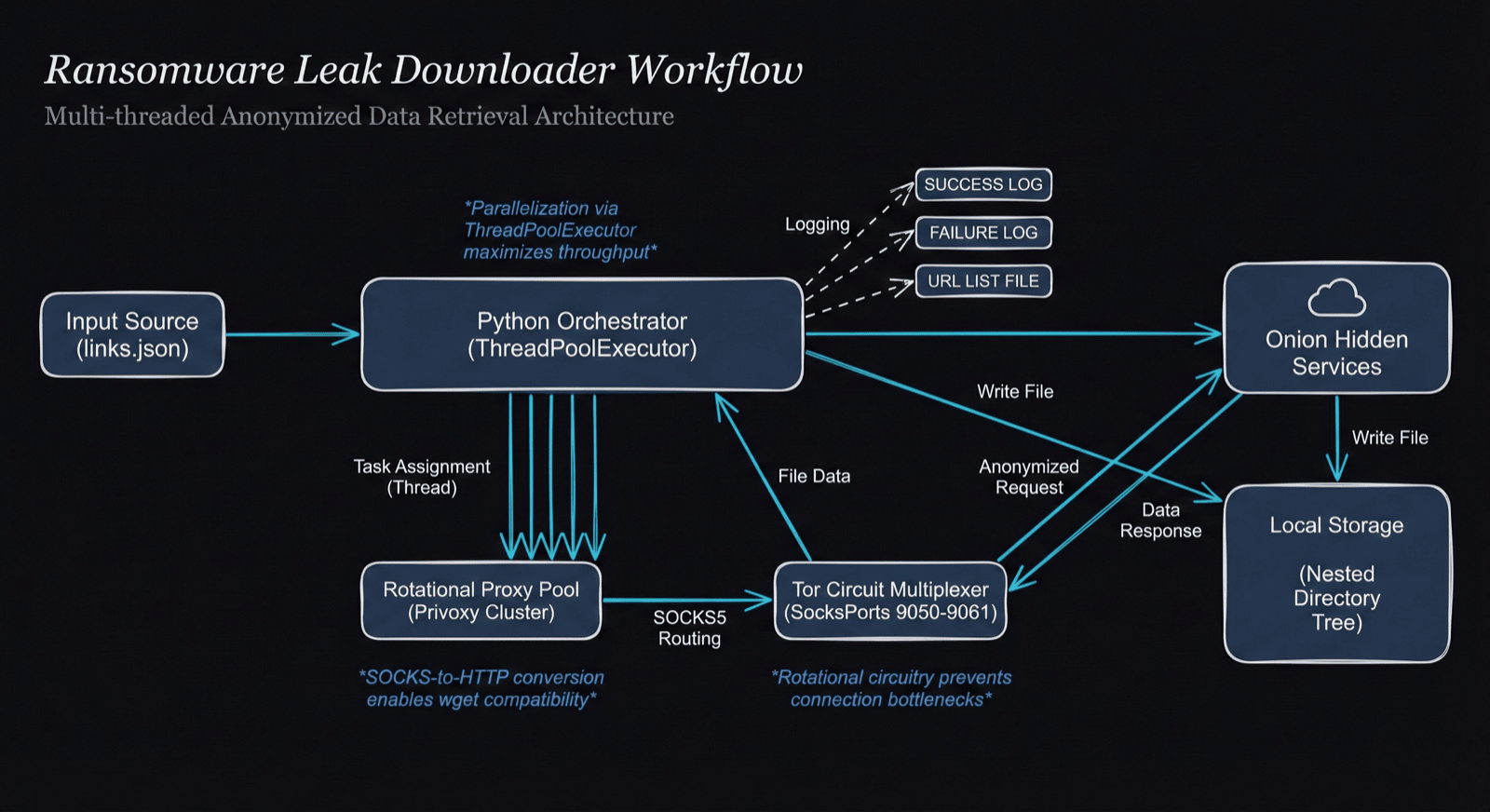
Figure 4: Automated ransomware leak collection Architecture (Generated with Nano Banana, updated by the author)
To bypass the bandwidth limitations of a single Tor circuit, we utilize a pool of Tor instances. By rotating through different circuits, we can maximize the available bandwidth of the Tor network.
We can create n number of Tor circuits by just adding additional Tor SOCKS ports. The snippet below shows torrc configuration file for Tor with multiple circuits:
# Default SOCKS port
SocksPort 9050

# Additional SOCKS ports for multiple circuits
SocksPort 9051
SocksPort 9052
SocksPort 9053
SocksPort 9054
SocksPort 9055
SocksPort 9056
SocksPort 9057
SocksPort 9058
SocksPort 9059
SocksPort 9060
To speed up the download process, we also add multithreading to the collection system. For the data downloading, we use wget due to its resume capability and integrity checks. The snippet below shows the wget command used in the automated script:
wget_args = ['wget', '-e', f'use_proxy=yes',
            '-e', f'http_proxy={proxy_url}', '-e', f'https_proxy={proxy_url}',
            '-P', folderpath, '-c', '-r', '-np', '--random-wait',
            '--no-http-keep-alive', '--level=inf', '--accept', '*',
            '--user-agent="Mozilla/5.0 (Windows NT 10.0; Win64; x64) AppleWebKit/537.36 (KHTML, like Gecko) Chrome/143.0.0.0 Safari/537.36"',
            '--no-check-certificate', '--progress=bar:force',
            '--tries=5', '-i', filepath]
The flags in the wget command are as:
- -c : Enables continuation of downloads/resume capability
- -r : Recursive retrieval from the directory structure of leak sites
- --level=inf : Set recursion depth to infinite
- -np : Prevents ascending to parent directories (to prevent other victim data downloads)
- --random-wait : Inserts random delay to mimic human behavior
- --no-http-keep-alive : Disables persistent HTTP connections, closing each for better proxy compatibility
Figure 5 shows the client-server architecture of how the script works in action from both client perspective (our isolated machine where collection starts) and the server (ransomware leak onion site)
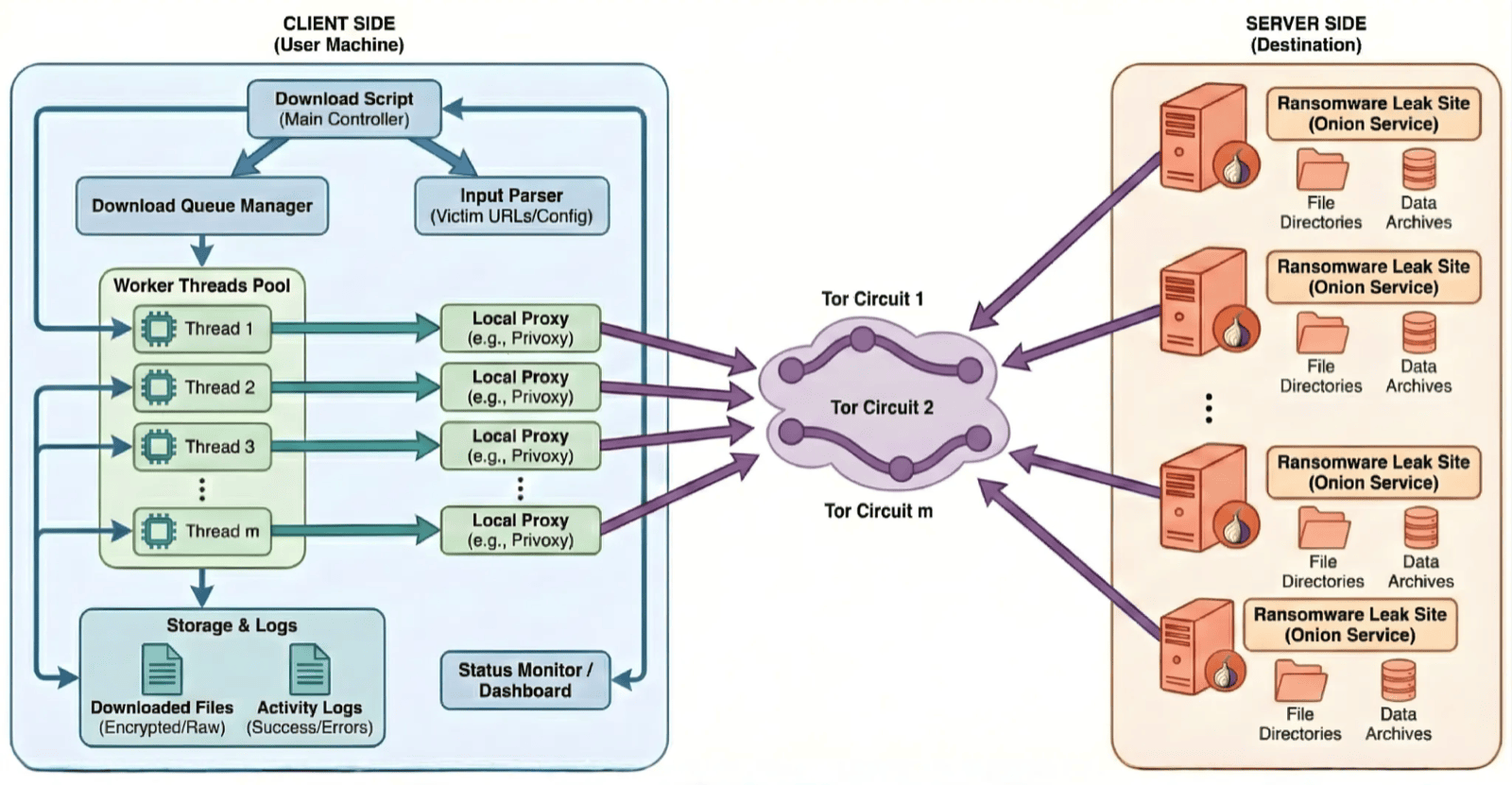
Figure 5: Client-Server Architecture for automated ransomware leak collection (Generated with Nano Banana, updated by the author)
As
wgetdoesn't have SOCKS support, we utilize a proxy service likeprivoxyto route Tor route. (As shown in Figures 4 & 5)
Once collection is complete, the script automatically generates a SHA-256 hash manifest for every retrieved file. This step is critical, as it ensures that any intelligence produced downstream can be traced back to a verified, untampered source.
With the data mirrored and verified locally, the analyst transitions from "Collection" to "Scoping," leveraging the metadata already provided by the threat actors or generating one using the LLM.
Understanding the Dataset & Scoping
Once automated collection is complete, the analyst often faces hundreds of gigabytes of raw, unstructured data. The temptation is to start grepping immediately—but in a professional workflow, we first understand and scope the dataset. The goal is to separate high-signal business intelligence from operational noise before committing deep analytical resources.
Most modern ransomware groups understand that their "customers" and the media need to see proof of theft quickly. To facilitate this, they often publish pre-generated file trees or directory listings alongside the bulk data.
First step is to leverage these file trees to understand what type of data is present in the leaked data and filter out the noise. We utilize terminal-based LLM tools (Claude Code, Gemini CLI, etc.) to perform data analysis. Steps for initial analysis are:
- Isolate the Tree: Feed the pre-existing file tree into the LLM terminal tool (Claude Code or Gemini CLI).
- Identify High-Signal Paths: Ask the LLM to identify directories or files likely containing sensitive data such as
/finance/,/legal/,/HR/, or/backups/. - Filter Noise: Have the LLM identify low-value directories or files that can be excluded from initial analysis.
Do not blindly trust the file tree provided by the threat actors. Always verify with the downloaded files with the file tree.
If the threat actor has not provided a file tree, the workflow shifts to Agentic Generation. Instead of the analyst manually exploring the large dataset and scoping, we task the LLM with generating its own manifest. A sample LLM Prompt for this task is as:
Analyze all the directories and its files and generate a summary of the top directories and their likely contents for sensitive data. Create a TREE.md file with these top directories and files.The LLM then uses the data to "build its own map," creating a .md file that serves as a persistent context for the reasoning tasks in Phase 3.
Even the most advanced LLMs have limits on how many files they can process at once. By focusing on the file tree first, we bypass these limits. The LLM can reason over the structure of a 1TB leak in seconds. This allows the analyst to say: "Now that you've seen the tree, focus all your future tools only on the /accounting/ folder." This ensures the LLM's attention remains focused and isn't diluted by irrelevant system files.
After the initial analysis and scoping, the "noise" is filtered out and the analyst is ready to move into the Agentic Analysis phase.
LLM-Assisted Leak Analysis
This is the critical phase of the workflow. Here, we use terminal-based LLM tools like Claude Code, Open Code, Gemini CLI, and others to analyze the downloaded ransomware leak data. The LLM acts as an AI agent, autonomously using Unix utilities, writing analysis scripts, and generating reports.
To ensure the LLM operates with high signal and low noise, we provide instructions in a markdown file that defines its persona and constraints. A sample INSTRUCTIONS.md file snippet is shown below:
You are an expert threat intelligence analyst. You have access to a victim ransomware leaked dataset. Your goal is to analyze all the directories and files and identify sensitive data including PII, company files, financial files, etc.

Operational Constraints:

Do not read binary files directly; identify them and report their existence.

If you encounter an archive (zip, 7z, tar.gz), automatically decompress it and then analyze files.

If the archive is corrupted, retreive the headers & metadata of the files within the archive.

Propose a search plan before executing a destructive or high-compute command.

Always verify each stage of the analysis.
The
INSTRUCTIONS.mdfile must have the initial analysis & scoping output showing the relevant directories and files to analyze. This will instruct the LLM to use its context effectively.
The LLM will follow the analyst's instructions and questions in performing the leak analysis. Some of the questions that the analyst must ask to the LLM are:
- Identify the unique list of PII (name, SSN, passport, date of birth, etc.) found in the dataset
- Identify the unique list of emails found in the dataset and provide summary of findings
- Identify any sensitive company documentations that are part of the dataset
- Identify list of third parties that are mentioned in the dataset
- Identify any API keys or sensitive keys mentioned in the dataset
The LLM will output structured set of findings and summary that can be disseminated accordingly.
Intelligence Dissemination
After the analysis and analytical findings from the LLM, we transform it into specific intelligence depending on the audience. This can be report, chart/visualization, or presentation.
For the primary victim organization, the priority is understanding the depth of the exposure. We task the LLM with generating a structured Impact Summary that categorizes the leaked data. The categories can be as:
- Identity Exposure: Unique lists of PII (names, SSNs, passports) found in HR or legal directories.
- Credential Exposure: Plaintext passwords, SSH keys, or session tokens discovered in configuration files.
- Business Secrets: High-value intellectual property, acquisition documents, or strategic plans.
For any third-party data belonging to the victim's vendors, partners, or clients, the priority is knowing the names of the third-parties and what type of data is involved. We again task the LLM to generate structured summary of this. The categories can be as:
- Vendor Contracts: Service providers whose name or credentials appear in the victim's data.
- Customer PII: Third-party customer information exfiltrated from CRM databases.
- Cross-Tenant Credentials: Cloud service keys or API tokens that provide access to third-party environments.
When third-party exposure is confirmed, the ethical and professional response is to initiate the "Duty to Warn" process. This is a high-sensitivity task that requires clear, non-alarmist communication.
We can also task the LLM to create visualizations/chart including trend analysis. The categories of trend analysis can be volume analysis, keyword/content analysis, PII analysis, time-based analysis, etc.
By the end of this, the raw large ransomware data leak has been translated to finished intelligence using LLMs. This workflow proves that with the right tools, we can automate and speed up the process of ransomware collection & analysis.
Case Study: Logitech Breach [Cl0p Oracle E-Business Suite Zero-Day]
This case study will demonstrate how LLM terminal tool (Gemini CLI for this case study) is used for ransomware leak analysis. To demonstrate the real-world efficacy of this workflow, we applied it to a massive 1.7 TB of archived dataset exfiltrated by the Cl0p ransomware group. Logitech was one of the many victims Cl0p extorted by exploiting using the Oracle E-Business Suite Zero-Day vulnerability. You can read more details about Cl0p and the Oracle E-Business Suite Zero-Day:
- https://www.sentinelone.com/anthology/clop/
- https://cloud.google.com/blog/topics/threat-intelligence/oracle-ebusiness-suite-zero-day-exploitation
- https://www.securityweek.com/logitech-confirms-data-breach-following-designation-as-oracle-hack-victim/
The Logitech data was downloaded from Cl0p victim leak site and does not have a file tree shared by the threat actor. Figure 6 shows the Cl0p leak site.
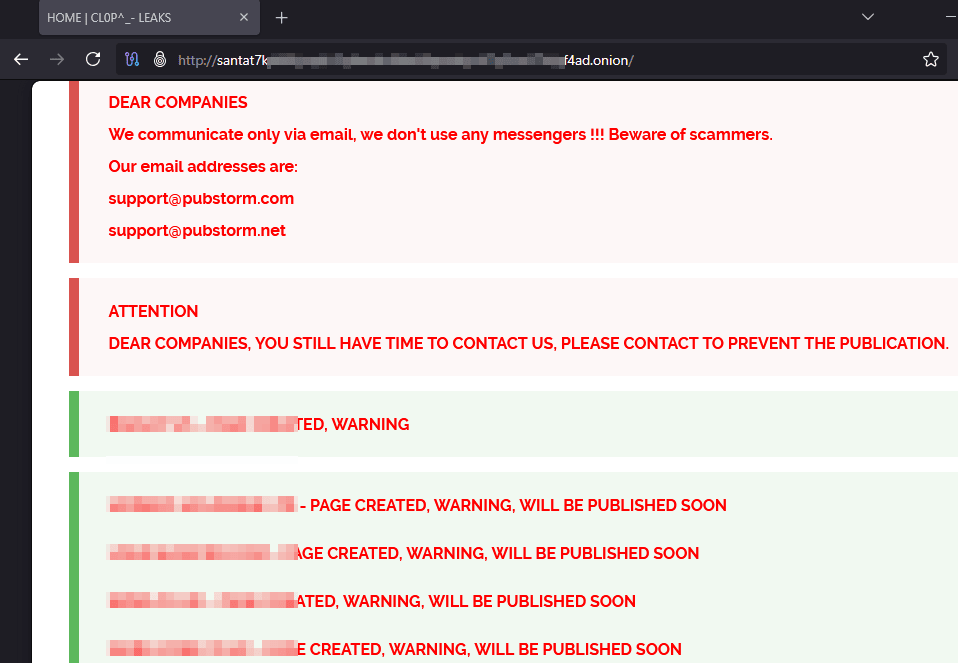
Figure 6: Cl0p ransomware leak site
We are going to use Gemini CLI for the analysis. The first step is initial analysis & scoping which will be performed by the Gemini as the data is not accompanied by a file tree. We run Gemini in an isolated directory containing the archived Logitech data. The screenshots below shows the initial scoping questions & output by the LLM.
Always execute terminal-based LLM tools, such as Gemini CLI or Claude Code, within designated project directories or dockerized containers to maintain isolation and control. Never enable unrestricted modes (e.g., --dangerously-skip-permissions flags) when analyzing sensitive ransomware leak dataset, as these bypass permission prompts and auto-approve actions, risking unintended file modifications, command execution.
Figure 7 & 8 shows the snippet of the initial analysis and scoping along with working steps by Gemini. Figure 9 & 10 shows the initial analysis by Gemini.
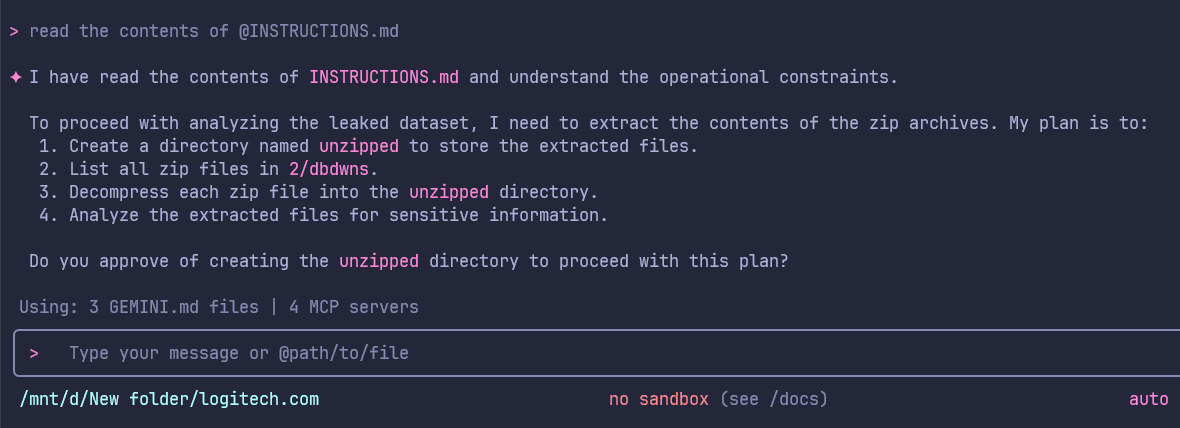
Figure 7: Contents of INSTRUCTIONS.md
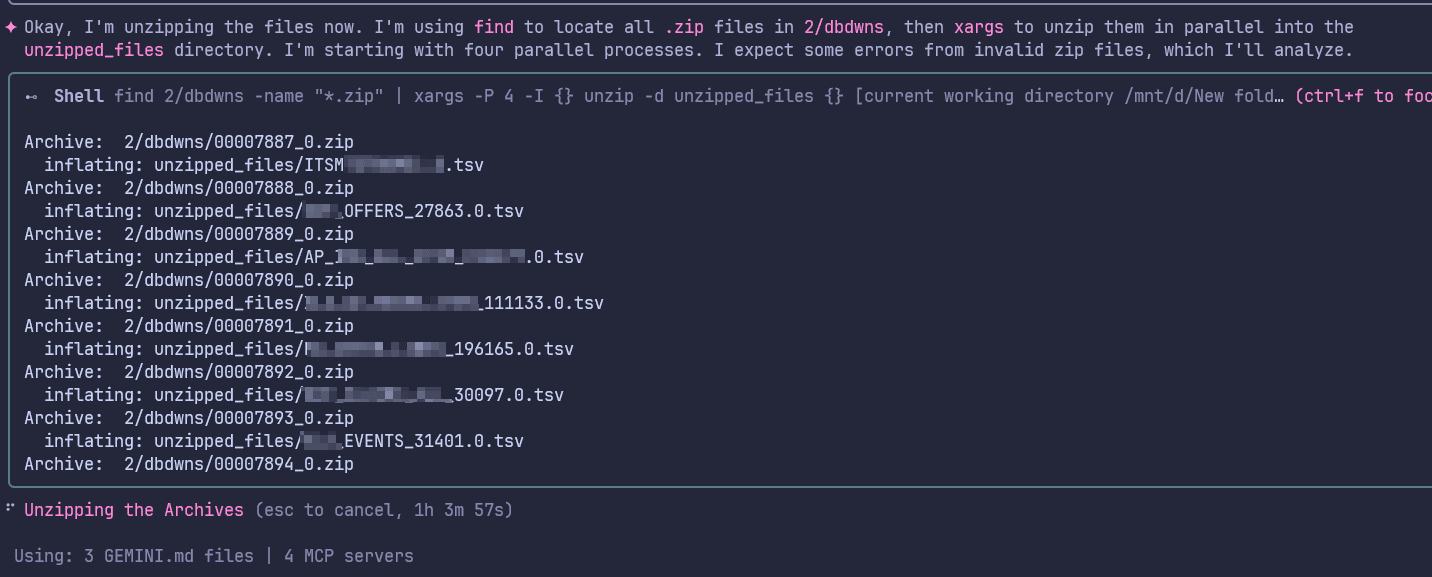
Figure 8: Gemini unzipping files in parallel
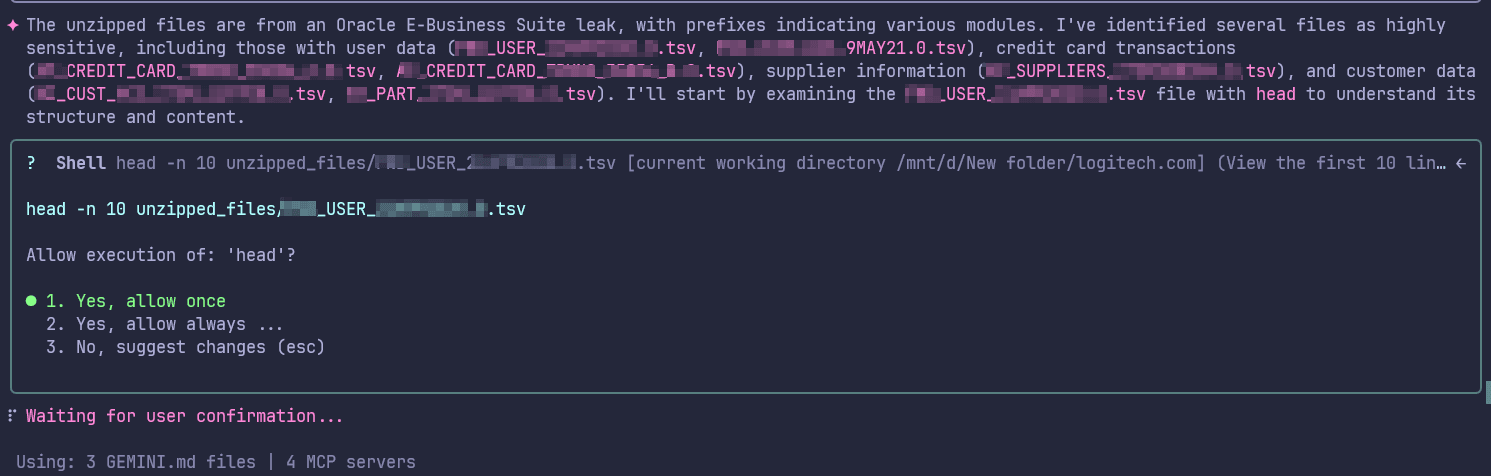
Figure 9: Initial analysis of the unzipped files
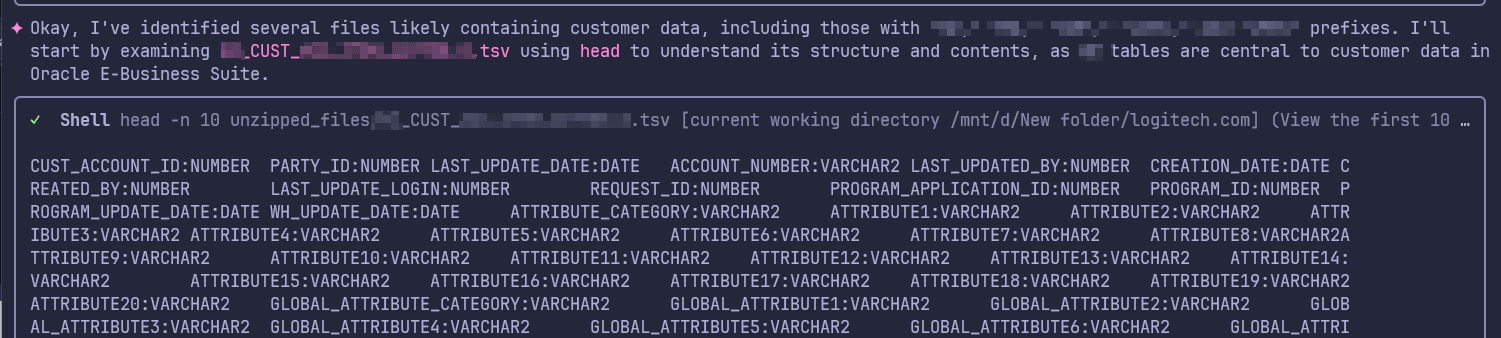
Figure 10: Initial analysis of the customer data and fields
After the initial analysis, we update our INSTRUCTIONS.md file to include initial analysis & scoping output for Gemini to understand the scope and filter out noise.
For the first task, we asked the Gemini CLI with identifying potential third-party exposure by hunting for unique email domains within the datasets. Figure 11 shows the snippet of working of Gemini for this task. The final output was a structured email_summary.md. Figure 12 shows the final output markdown file.
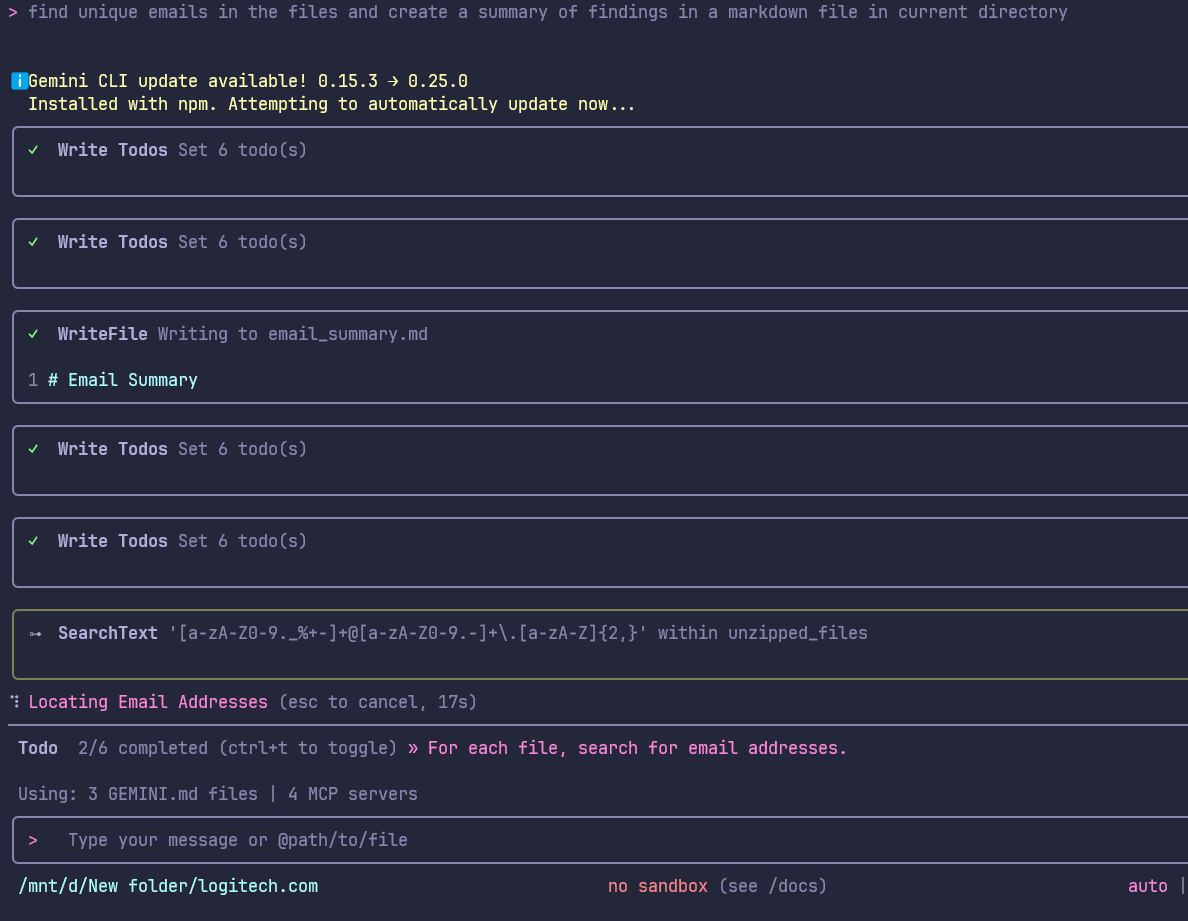
Figure 11: Unique Email Analysis
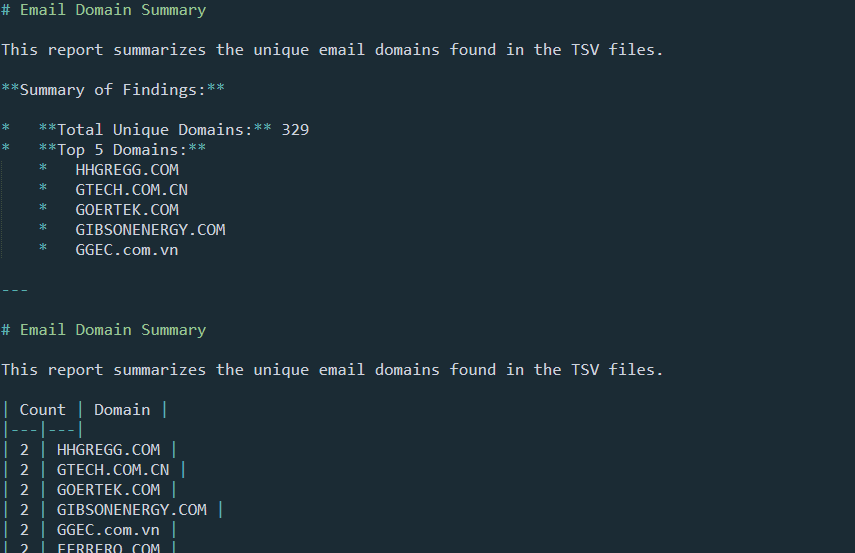
Figure 12: Email Analysis Summary
For the second task, we asked the Gemini CLI with any sensitive company documents in the dataset. Figure 13 shows the snippet of working of Gemini for this task. The final output of this was a structured intel_output.md. Figure 14 shows the final output markdown file.
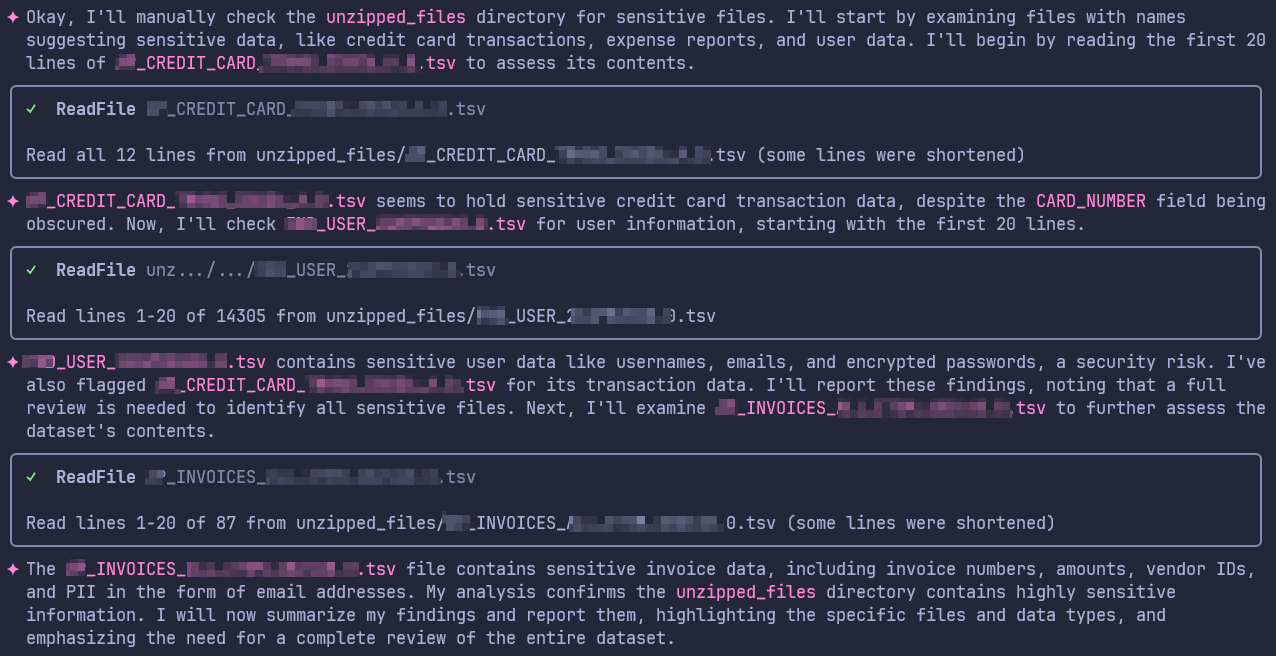
Figure 13: Working of Gemini for finding sensitive company documents
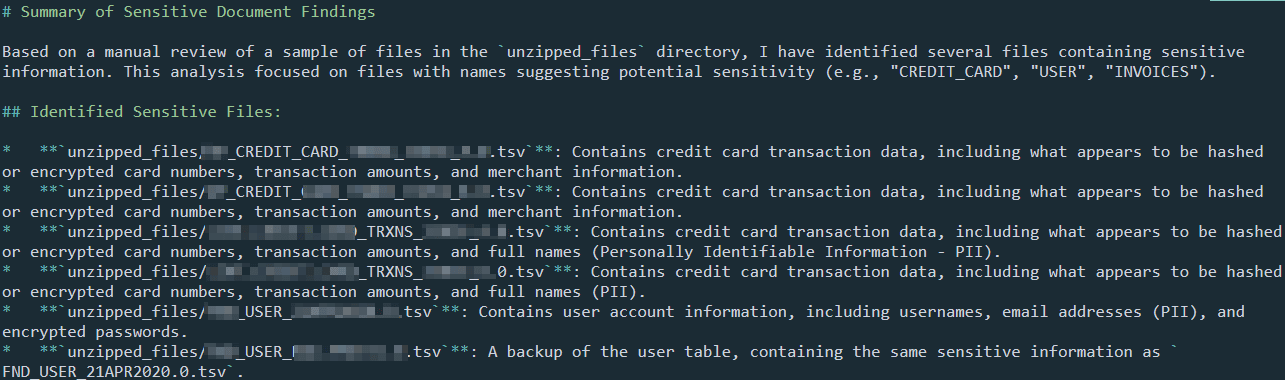
Figure 14: Sensitive Document Analysis Summary
We executed two separate tasks in Gemini CLI sequentially but if you want to perform multiple tasks then a more streamlined way of performing this in Gemini CLI or any other terminal-based LLM tools is through general purpose agents. You can task the LLM to execute each task/question simultaneously through multiple agents. The example snippet below shows how this can be prompted into the LLM. Figure 15 shows the agentic tasks created by Gemini running parallelly.
Execute these tasks using mutiple general purpose agents - Identify the unique list of PII (name, SSN, passport, date of birth, etc.) found in the dataset, Identify the unique list of emails found in the dataset and provide summary of findings, Identify any sensitive company documentations that are part of the dataset, Identify list of third parties that are mentioned in the dataset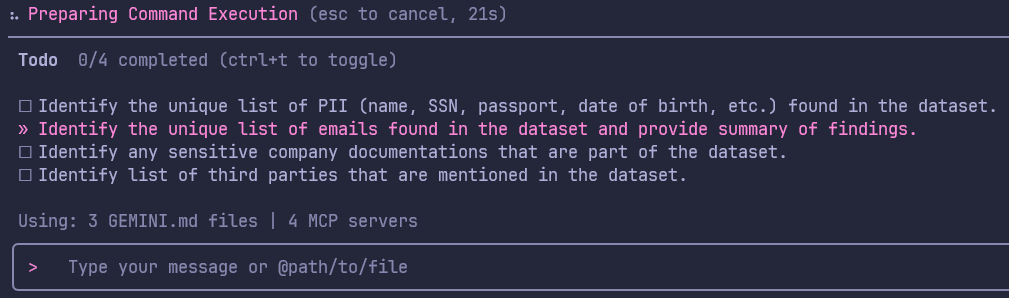
Figure 15: Agentic execution of multiple tasks
We also tasked the LLM to create visualizations based on the data & analysis. Figure 16 shows the volumetric trend analysis of the archived dataset and Figure 17 shows PII analysis of sample unarchived files. Terminal-based LLM tools can be used to generate any type of visualizations like terminal chart, HTML charts, etc. The volumetric chart was also generated in dynamic HTML chart format shown in Figure 18.
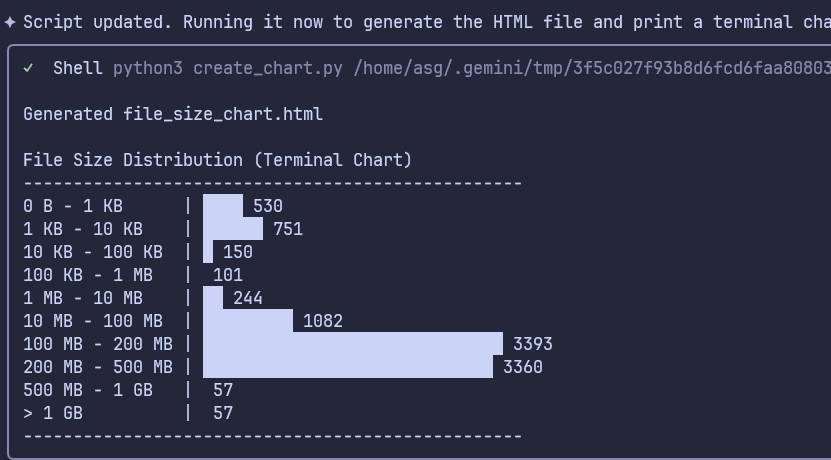
Figure 16: Volumetric Trend Analysis Chart (Terminal)
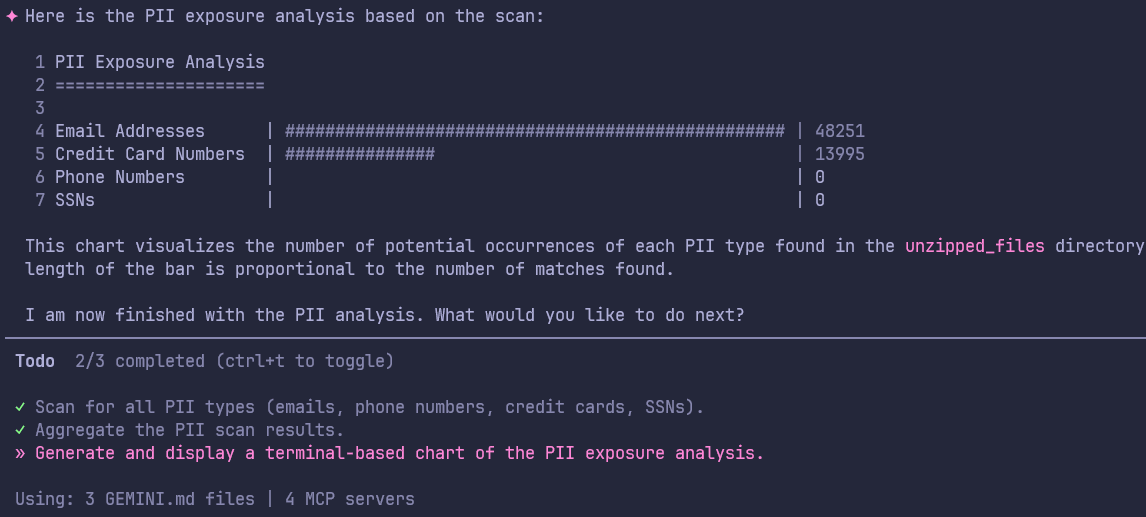
Figure 17: PII Exposure Analysis Chart (Terminal)
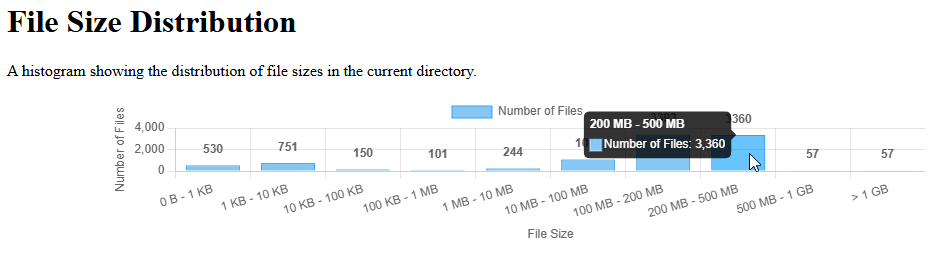
Figure 18: Volumetric Trend Analysis Chart (Dynamic HTML)
The analysis doesn't stop at generating visualizations and summary reports. While the LLM automates these tasks, the analyst must use them as a foundation for deeper research. For example, using Figure 19 (a chart of the top 10 file extensions) as a starting point, the analyst determines which specific files needs further examination to identify sensitive leaked data.
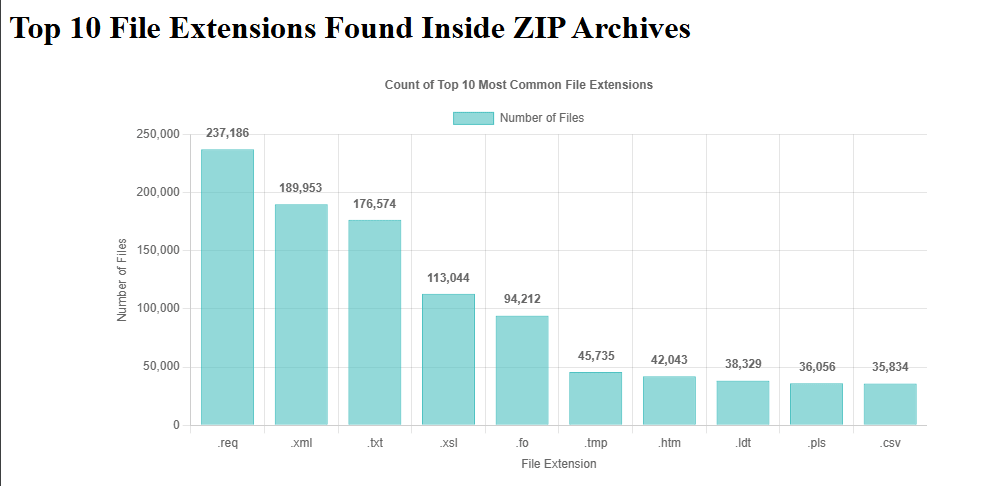
Figure 19: Top 10 extensions of files inside the leaked archives
In this case study, the analyst spent less than 30 minutes of active "keyboard time." The Gemini CLI handled the heavy lifting of navigating the directory structures and parsing file formats. This allows the analyst to focus on the critical thinking & research.
Limitations and Conclusion
LLMs demonstrate strong capabilities in general analysis but there are certain limitations in using LLMs for big data analysis. Common pitfalls of the analysis include:
- LLMs can skip crucial details during the analysis. They may occasionally invent file paths or directory structures when they lose context during deep recursive searches.
- LLMs might tag a file as "Highly Sensitive PII" based on its header, even when the file is actually a template or sample dataset.
- LLMs occasionally timeout during high volume tasks and longer sessions.
- Depending on which LLM you are using (cloud vs on-prem), LLM analysis can become prohibitively expensive in terms of API or compute cost.
Agentic analysis is a collaborative process between human and LLMs. The LLM handles the "Heavy Lifting" by searching, parsing, analyzing, and summarizing while the analyst handles the Validation. No automated finding should be included in a final intelligence report or a third-party notification without manual verification of the source file.
The sheer volume of ransomware leak data has historically overwhelmed analysts in getting valuable timely intelligence. By adopting an LLM-Assisted Analysis Workflow, we can bridge this gap.
A systematic approach of moving through automated collection, metadata-led scoping, agentic reasoning, and intelligence dissemination enables analysts to:
- Handle datasets that would take weeks in mere hours.
- Offload repetitive data discovery tasks to an agent.
- Produce higher-quality intelligence that directly supports notification and defense.
LLM-assisted analysis is a force multiplier. It doesn't replace the intuition, ethical judgment, or experience of an analyst but gives that analyst the speed needed to timely analyze and produce finished intelligence.